Jukebox
Open the map jukebox or status-bar jukebox control. The OST is a built-in source; Settings > Audio > Sources controls its visibility.
RimWorld always plays the bundled OST locally. The daemon plays radio and Spotify. Switching back to OST waits for the daemon to stop, so the two players do not overlap.
Playback controls act on tracks for OST and on stations for radio. Switching radio stations preserves the closest available bitrate. Pausing stops playback; playing restarts the selected source. Spotify track selection stays in its terminal.
For daemon audio playback, install rtkit on the machine running the daemon
and make its system D-Bus available so the daemon
can request real-time scheduling for its audio output thread. Playback continues
without that priority if the request fails; the daemon journal records the failure.
Internet radio
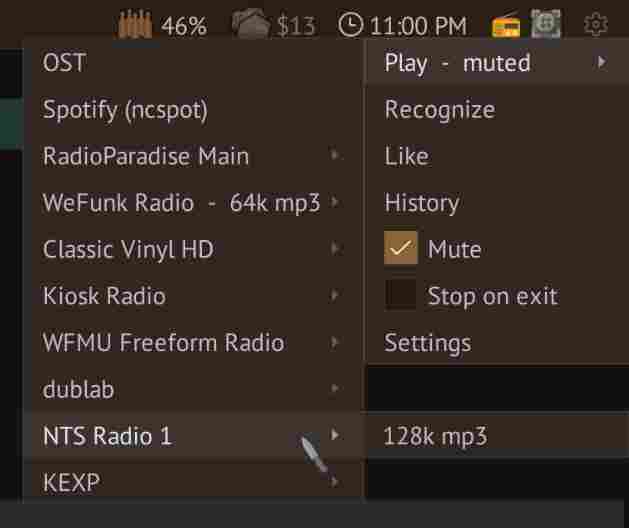
Add a radio station with Settings > Audio > Add source. Edit or remove sources in the Sources table. ICY metadata supplies the track display. Volume multiplies RimWorld’s audio settings; pause stops daemon playback and downloads.
For song recognition, install songrec on the game machine; it uses local audio output,
with pactl selecting the default output monitor.
Likes are saved locally; see Paths and files for stations
and liked-song locations.
Spotify via ncspot
This feature requires Spotify Premium and ncspot installed on the machine
running the daemon, with audio output available there. Sidecar mode does not
support Spotify playback. The source is hidden when ncspot is unavailable; hide it manually through
Settings if desired.
- Install
ncspot. - Choose Tune → Spotify (ncspot).
- Complete ncspot’s login.
- Choose music in its terminal.
Pausing or switching to OST/radio closes ncspot. Playing starts it again. Use its
terminal to resume or choose music. Stop on exit also applies. Playback and
Spotify library controls remain in ncspot. “Like” button writes only SlopWorld’s local likes.
Sidecar limitations
Sidecar mode uses RimWorld to play the bundled OST.
Internet radio, song recognition, and Spotify playback are not available.
Radio output
Settings → Audio → Daemon radio output selects where slopd plays radio. Leave Output and Backend on Auto for normal use. Auto shows the detected output in parentheses. The list contains outputs exposed by the daemon host’s audio system. With a sound-server output, use desktop sound settings to choose speakers or headphones. Refresh outputs updates the list and shows the currently open output.
The advanced backend preference can favor PulseAudio-compatible output (including PipeWire’s Pulse server), PipeWire, or the system default. If a selected output cannot open, the daemon falls back automatically. Save persists the choice on the daemon host and reconnects any playing radio stream; Discard restores the saved settings. These choices do not route RimWorld’s OST/game sounds or Spotify.